enRoute Delivery Route Planner
- 4.3
- Rating
- 10.00K
- Installs
- Free
- Price
 Analysis by App-foxy
When I try a delivery route planner, I am not only looking for the shortest line on a map. I want something that helps me make sensible decisions during a busy day without forcing me to hand over more information or manage unnecessary settings. enRoute Delivery Route Planner approaches that problem as a free Maps & Navigation app from Astraler, aimed at people who need to arrange several stops and keep driving time under control.
My first impression is that enRoute makes the most sense as a practical planning tool rather than a complete replacement for every navigation service. Its purpose is clear: organize a delivery run, reduce wasted movement, and use GPS guidance while I work through the route. That focus gives it a useful place between manually checking addresses one by one and relying on a general-purpose map app to figure everything out on the fly.
The app has a 4.3 average from around 347 ratings, with over 10K installs. Those numbers suggest a modest but real user base, and they also set the right expectation: this is not an enormous navigation platform with every possible transport feature. It is a focused tool for route planning, especially when the order of stops matters.
You May Also Like

 Pandora - Music & Podcasts
Pandora’s Music Is Easy to Start, but Harder to Recover
Pandora’s strength is its low-effort path from a seed to a station. Its weak spot is how much confidence it asks you to place in connection, setup, and quiet recovery.

 AccuWeather: Weather Radar
AccuWeather Review: A Quick, Clear Forecast for Everyday Decisions
For everyday plans, the best forecast is the one you can understand quickly. AccuWeather makes rain timing, radar, and local conditions easy to act on, with a few trade-offs.

 Hill Climb Racing
Why Hill Climb Racing Still Turns Crashes Into One More Run
A tiny car, a bumpy hill and one more upgrade: Hill Climb Racing keeps resurfacing because its simple chaos makes every near-miss feel personal.

 AliExpress - Shopping App
AliExpress Makes Global Shopping Feel Personal, but Shoppers Bear the Risk
AliExpress turns a global marketplace into a pocket-sized discovery engine. Its reach is useful, its shopping loop compelling, and its trade-offs easy to miss.

 Lords Mobile: Kingdom Wars
Lords Mobile Is a Kingdom-Building Routine, Not a Quick Match
A case-by-case verdict on the building, battles, device demands, and social commitments that make Lords Mobile rewarding for some players and exhausting for others.

 PDF Scanner app - TapScanner
TapScanner Makes Paperwork Easier to Capture, Check, and Share
TapScanner makes scanning with a phone feel less like a rescue operation and more like a dependable step in getting work done. Its capture tools are useful, though not flawless.
More From Our News Desk
View All News


What using enRoute feels like during a delivery day
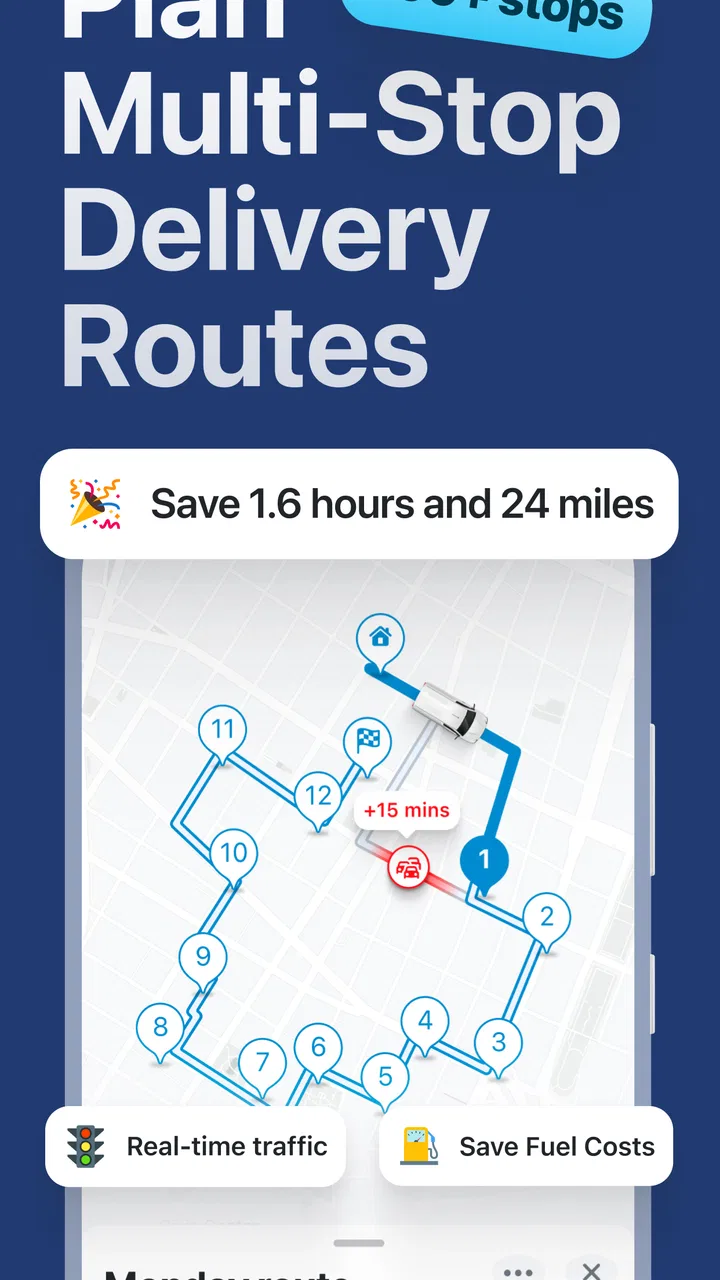
The most convincing use case is a driver who already knows the day's destinations but does not want to decide the sequence manually. A courier, local shop owner, service worker, or small business operator can use a route planner to turn a scattered list of stops into a more manageable journey. The benefit is not just distance on paper. A better order can mean fewer awkward backtracks, less time searching for the next address, and a clearer idea of how the day will unfold.
I find this especially useful when the stops are spread across familiar areas but do not follow an obvious pattern. I may know where every customer is, yet still waste time by visiting one nearby address too early and crossing the same road again later. A dedicated planner encourages me to think about the whole run before leaving, instead of treating each destination as an isolated navigation request.
There is also a useful distinction between planning and driving. General map apps are excellent when I need directions to one place, traffic context, business information, or a broad range of travel modes. enRoute is more appealing when the central question is, “How should I arrange this group of deliveries?” That narrower purpose can make the workflow easier to understand, provided my work really revolves around multiple stops.
In a realistic everyday scenario, I might receive several delivery addresses in the morning, enter them before setting off, and review the proposed sequence while I am still parked. I would then use the route as a working plan rather than blindly following it. If a customer changes availability, a road is blocked, or I need to return to the depot, I would expect to reassess the route instead of assuming the original order remains perfect. That habit is important: route optimization is a starting point, not a substitute for judgment.
Where the focused design helps
A specialized planner can reduce the mental load of a multi-stop day. Instead of repeatedly switching between a notes app, a map, and a mental list, I can keep the route-planning task in one place. Even when the time saved on each individual leg is small, avoiding several poor turns can make the whole schedule feel less chaotic.
Another advantage is fuel awareness. A shorter or better-ordered route does not guarantee lower fuel use in every situation, because traffic, hills, waiting time, and vehicle type still matter. However, removing unnecessary loops is a sensible first step. I would treat the app's planning value as a way to expose avoidable movement, not as a promise of a precise fuel calculation.
For a new driver or someone taking over a delivery round, the route can also serve as a visual overview. Seeing the stops together may reveal that an apparently urgent destination is actually close to another planned visit. That kind of overview is harder to get when I enter each address separately into a standard navigation app.
Three practical habits that make the planner more useful
My first tip is to prepare while stationary. Entering or adjusting destinations at the curb, in a loading area, or during a rushed stop is a poor workflow for any GPS tool. I would build the route before departure, check that the addresses are recognizable, and only then begin navigation. This is both safer and more efficient than trying to reorganize the day while moving.
Second, I would separate fixed commitments from flexible stops. If one customer has a narrow delivery window, that destination should influence the plan even if it is not the mathematically shortest first stop. A route planner can arrange locations, but it cannot replace the human knowledge behind appointment times, loading restrictions, or customer instructions. I would use enRoute to reduce unnecessary travel after deciding which stops have priority.
Third, I would keep a backup view of the day's addresses outside the app when the route is important. That does not mean the planner is unreliable; it is simply sensible operational practice. A written list or business record can help if I need to confirm a customer, change the order, or explain why a stop was postponed. The route should support my delivery process, not become the only record of it.
Trust, controls, and moments that deserve attention
Navigation apps naturally touch sensitive parts of daily life because location is involved. I therefore judge enRoute less by reassuring language and more by the choices visible when I use it. The app is rated for Everyone, is free to install, and runs on Android versions from 8.1 onward. Those details make it accessible to many older devices, but they do not by themselves answer every privacy question a careful user may have.
When I use any GPS planner, I pay attention to when location access is requested, whether the app explains why it needs that access, and whether I can continue planning without actively navigating. Those are meaningful moments for user control. Planning a delivery sequence from entered destinations is different from sharing live movement during a trip, so I prefer an app experience that makes that distinction clear rather than treating every task as continuous tracking.
I would also look closely at the app's account and device prompts before committing to a regular work routine. If a service asks me to sign in, I want to understand what that account is used for and whether I can manage the route without creating a profile. If it requests access to contacts, files, or other phone areas, I would check whether that permission is genuinely needed for my chosen workflow. The safest approach is to grant only the access that matches the task I am performing.
These checks matter most for professional drivers because their routes can reveal customer locations, working hours, and business patterns. Even a small delivery operation should avoid casually entering sensitive details into tools without considering who can see them and how long they remain available. I would use recognizable address labels rather than unnecessary personal notes, and I would remove or avoid extra information that the route itself does not require.
What the visible choices mean in practice
For me, trust is strongest when the app lets me decide how much of my trip is exposed. A route planner should be useful before I start driving, during the journey, and after an unexpected change, but those stages do not all need the same level of location access. I would review Android's permission controls, keep location access aligned with actual use, and revisit those settings after updates.
The current version is 2.0.1, so I would not assume that every screen or permission prompt will remain identical forever. Updates can improve navigation, change the layout, or alter how a device presents access requests. After updating, I would quickly check the app's permissions and any account-related controls instead of accepting every prompt automatically. This is a small habit, but it keeps the user in charge of a tool that may accompany them throughout the day.
There is also a practical trust issue around in-app purchases. The app is free, while optional purchases range from $3.99 to $29.99 per item. I would start with the free experience and decide whether the planning workflow genuinely fits my needs before paying for anything. A purchase can be worthwhile for someone who uses route planning frequently, but occasional users should be careful not to spend simply because a busy day makes every extra option feel urgent.
I also prefer to evaluate a paid option against the problem it solves. If a purchase removes a repeated inconvenience in my delivery routine, it may justify itself over time. If I only need to arrange a few stops once in a while, a general map app or a manual plan may be enough. The important point is to judge the purchase by actual use, not by the presence of a higher-priced option.
Data-sensitive moments during real use
The most sensitive moment is usually not the first launch; it is the point where I begin entering real customer addresses. I would avoid putting full names, phone numbers, order notes, or access instructions into any field unless they are necessary for navigation. A street address may already be sensitive enough. Keeping the route data minimal reduces the consequences if the phone is shared, lost, or used by another member of a team.
Another important moment comes when a route changes. If a customer cancels, I would remove or replace that stop rather than leaving outdated information in the plan. If I am using a work phone, I would also make sure old routes are not left visible to the next person who uses the device. These are ordinary operational choices, but they matter more than a vague promise that an app is “smart.”
Live navigation deserves the same care. I would keep the phone mounted, avoid interacting with it while moving, and make changes only when safely parked. If the app's guidance conflicts with a local restriction, a delivery entrance, or a road sign, I would follow the real-world instruction. No route optimizer knows every temporary closure, loading rule, or private access condition.
This is where enRoute should be viewed realistically. Its value is in organizing a multi-stop trip and supporting GPS navigation, not in eliminating the need to verify the road environment. Weather, traffic, construction, and customer availability can all overturn an otherwise sensible sequence. I would use the app to prepare better, then stay alert to conditions that the route cannot predict perfectly.
Who should choose it, and who should look elsewhere?
I would recommend trying enRoute if I regularly handle several deliveries, service visits, or errands in one outing and want a dedicated way to think about their order. It is also a reasonable option for someone who finds general map apps too centered on one destination at a time. The focused purpose can be more comfortable for a small operator who wants a straightforward route-planning companion without immediately moving to a large logistics system.
I would be more cautious if my work depends on advanced fleet coordination, shared dispatching, detailed customer communication, or complex delivery constraints. In that situation, a full logistics platform may be better because route order is only one part of the operation. I would also look elsewhere if I mainly need public transit, walking directions, cycling information, business discovery, or live traffic tools. A broad navigation service is likely to be more versatile for those needs.
People who rarely make multi-stop trips may not notice enough benefit to change their routine. If I am driving to one destination, the usual map app on my phone is probably simpler. enRoute becomes more compelling when the route itself is the problem: several addresses, repeated backtracking, and a need to see the day as one connected journey.
My cautious verdict after weighing convenience and control
enRoute Delivery Route Planner has a sensible role in the Android navigation space. Its strongest quality is focus: it is built around arranging delivery routes rather than trying to be every kind of map service at once. I like that this gives the user a chance to plan before driving, compare the shape of a day's work, and avoid some needless movement.
At the same time, I would not treat it as an automatic answer to every delivery challenge. The route still needs human review, especially when appointments, vehicle limits, local access rules, or changing conditions matter. I would also make privacy and permission checks part of my setup, keep customer information to a minimum, and review the choices shown by Android after updates.
With a free entry point, an Everyone age rating, and support for Android 8.1 and later, it is easy to test without immediately reorganizing an entire workflow. Astraler's app is worth a look for independent couriers, small businesses, and anyone tired of planning several stops manually. My recommendation is measured rather than unconditional: try it on a normal route, compare the result with the way you currently work, and consider an in-app purchase only if it removes a problem you face repeatedly.
In short, I see enRoute as a useful planning companion for multi-stop driving, not a replacement for careful navigation or responsible data handling. If your main challenge is deciding the order of several deliveries, it is the kind of focused tool I would test first; if your needs are broader than route order, a more comprehensive navigation or logistics service may suit you better.
FAQs for enRoute Delivery Route Planner
01What is enRoute Delivery Route Planner used for?
enRoute Delivery Route Planner is designed to help drivers and delivery businesses organize multiple stops into a more efficient route. After entering delivery addresses, the app can arrange them in a practical order, helping reduce unnecessary driving, save time, and simplify daily delivery planning. It may be useful for couriers, local businesses, field-service workers, and anyone who regularly visits several destinations in one trip.
02Can enRoute optimize routes with many delivery stops?
Yes, the app is intended for planning routes that include multiple destinations rather than handling only one trip from point A to point B. Users can add their stops and allow enRoute to organize the sequence more efficiently. The exact number of supported stops and available limits may depend on the version, subscription, or device platform, so frequent professional users should check the current listing before downloading.
03Does enRoute provide turn-by-turn navigation?
enRoute focuses primarily on route planning and stop optimization, while navigation may be completed through an integrated or connected mapping application. Once a route is prepared, drivers can generally follow the planned sequence and open individual stops in their preferred navigation service. Because navigation features and integrations can change, users should confirm whether their preferred maps app is supported on Android or iOS.
04Is enRoute Delivery Route Planner free to download?
The app may be available to download without an upfront charge, but some advanced features can require in-app purchases, a subscription, or a paid plan. These restrictions may apply to the number of stops, saved routes, optimization tools, or professional features. Before relying on it for business use, review the current store page carefully to understand trial terms, recurring billing, and any platform-specific limitations.
05Is enRoute suitable for professional delivery drivers?
enRoute can be a practical option for couriers, small delivery companies, and independent drivers who need a clearer way to arrange several stops during the day. Its usefulness depends on factors such as address accuracy, traffic conditions, mobile data, and the number of deliveries in a route. It is best viewed as a planning aid, and drivers should still verify the route and follow local traffic regulations.
Pros
- Optimizes multi-stop routes to reduce driving time and fuel use.
- Supports efficient planning for delivery drivers and field teams.
- Clear map-based navigation makes stops easy to follow.
- Helps organize multiple addresses in a single delivery route.
- Useful for adjusting routes when schedules or priorities change.
Cons
- Advanced routing features may require a paid subscription.
- Route quality depends on accurate addresses and map data.
- Large delivery lists can take time to review and fine-tune.
- May use significant battery power during long navigation sessions.
- Not ideal for users who only need occasional
- single-destination directions.

enRoute Delivery Route Planner
Gallery